
Why We Built a New Notion-to-WordPress Plugin
Notion is one of the most powerful tools for creating content, notes, and workflows but when it comes to publishing that content to the web, it falls short. Most people either rely on Notion’s built-in “Publish to web” feature or pay for hosted services that proxy content through another domain.
That’s fine for quick pages. But if you’re running a real website, with navigation, SEO, and visual consistency, you quickly hit a wall.
When we started exploring Notion WordPress integration, we found:
- Paid “freemium” plugins that restricted content types or record counts
- Hosted proxies that removed control over your brand and analytics
- No serious engineering solutions for mapping Notion data into native WordPress content
So, we did what we do best — we built it properly.
Introducing Notion-Sync: The Open Source Alternative
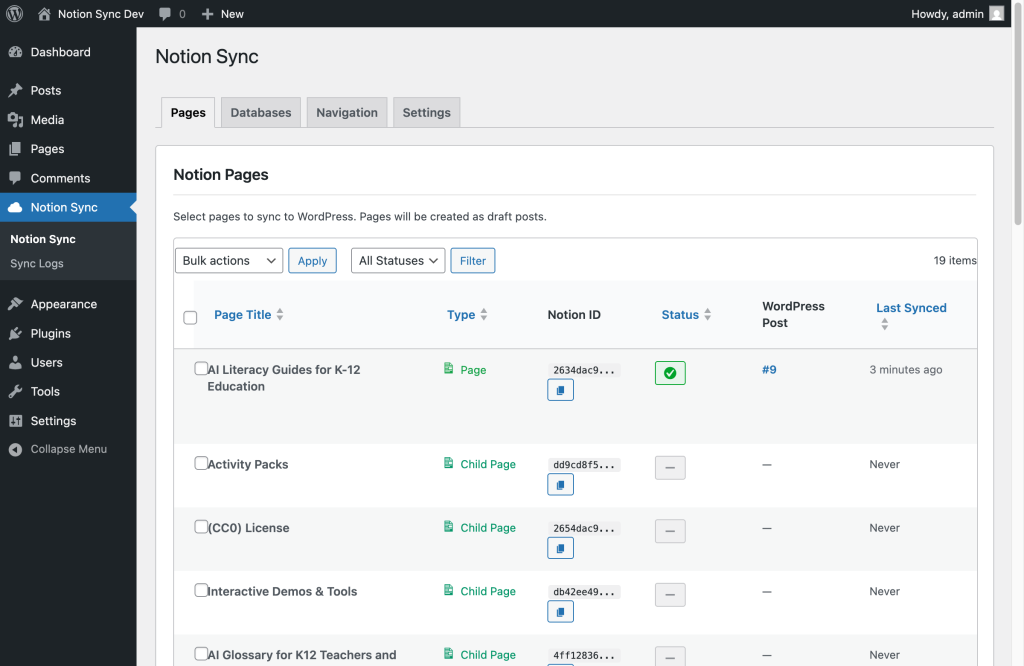
Notion-Sync is a free, open-source WordPress plugin that connects directly to your Notion workspace and gives you the power to sync databases, pages, and media straight into WordPress — all under your control.
Unlike other tools that iframe Notion content or require premium upgrades, Notion-Sync converts your Notion blocks into native WordPress content. That means you can:
- Design and style pages using your existing WordPress theme
- Add menus, categories, and navigation for true site structure
- Retain full SEO control, metadata, and custom slugs
- Host your content on your own domain – not behind someone else’s paywall
- No subscriptions – we had to solve our own problem, so you get it for free
👉 See it on GitHub
(Currently in review for the official WordPress Plugin Library)
Engineering Focus: How It Works
The plugin was designed with simplicity and extensibility in mind – a hallmark of The VGER Groups engineering philosophy.
- Sync Engine: A lightweight Python/Node hybrid service (depending on use case) retrieves structured data via the Notion API, normalizes it, and pushes updates through WordPress REST endpoints.
- Custom Post Types: Each Notion database maps to a WordPress custom post type, giving users flexibility in how content is displayed.
- Media Handling: Images are fetched from Notion, stored locally, and linked properly within the WordPress media library for consistent performance and SEO indexing.
- Layout Control: WordPress shortcodes and templates make it easy to customize presentation — no rigid iframe limitations.
- Menus this was the main driver, when we published to the web there were no menus for navigation, we had to find another SaaS who simply proxies the notion site and adds the pages as a menu and they charge you.
Enough was enough, if it’s got an API we will bring it under control !
In short, it’s engineering-driven, not marketing-driven.

For Developers: Extensible by Design
If you’re a developer or content engineer, you can extend Notion-Sync to:
- Build custom mappings for specific database schemas
- Add pre-processing hooks for Markdown, HTML, or block transformations
- Integrate SEO and analytics metadata from Notion properties
- Implement CI/CD workflows for automatic publishing
Because it’s open source, you can tailor it to your stack – whether you’re managing a multi-author content team or automating product documentation.
Vendor Options
Notion is an thought and idea capturing tool, but lacks simple clean exports. Once you’re in it it’s hard to get out. However syncing your content to WordPress starts opening the doors. Not only do you end up with a backup of your notion content, you also are now in an ecosystem that has open standards, runs 48% of the internet websites, but has been around for decades and has integrations and plugins for almost everything.
- Add your notion posts to a corporate intranet without having to buy additional seats? Go ahead
- Want to add a blog to your WooCommerce? Sure go for it.
- What about adding SEO or Ads or whatever you can dream of in WordPress? Have at it.
Why Open Source Matters
At The VGER Group, we believe open source is the foundation of innovation. Too many WordPress plugins hide basic functionality behind paywalls. Our goal is to make tools that work well, scale well, and stay accessible to both creators and developers.
We’re proud to contribute something back to the community — a truly open Notion WordPress integration that doesn’t compromise on quality or control.
Try It Yourself
- Visit the GitHub repo: https://github.com/thevgergroup/notion-wp
- Follow the quick-start guide
- Join the discussion and help us shape future releases
The VGER Group
AI, Data, and Engineering — making technology practical, scalable, and open.
Ship faster with The VGER Group
AI, data, and software engineering expertise bundled into outcomes—not tickets.