
Escape the limits of memory
These days I spend a good deal of time with Data products, either AI driven and / or heavy ETL based. The language I choose that makes this easier is Python with Dataframes. You’re not here to learn python, not going into why you should use it, plus it’s the internet, nobody will agree and it will all change with enough time — you’re here because you’ve probably run into Out of Memory, MemoryError, Killed or CPU issues running jobs right?

Out of Memory
data always grows
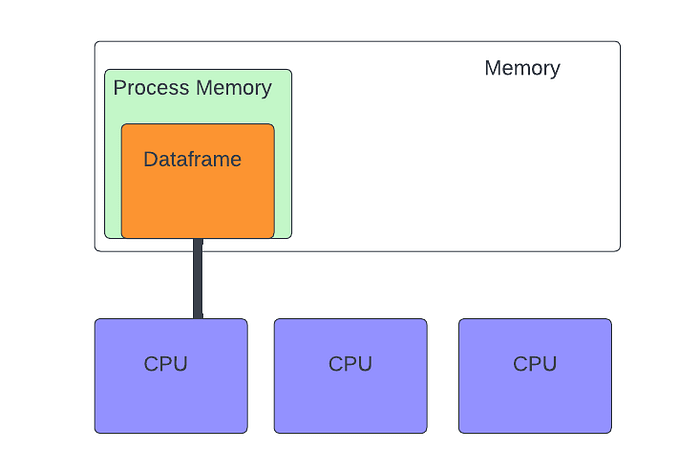
If you’re googling for solutions on scaling python, reading the py docs or blogs most will tell you load less data, thanks Captain Obvious … next tip change data types from objects to ints, datetypes etc.. similar to storing blobs in a database, reduce cardinality. That’s going to give you a little elbow room, but not much as data always grows. The fundamental issue is Pandas is an in-memory data structure that’s operated on by a single CPU.
Wes Mckinney wrote his infamous 10 things he hates about Pandas https://wesmckinney.com/blog/apache-arrow-pandas-internals/
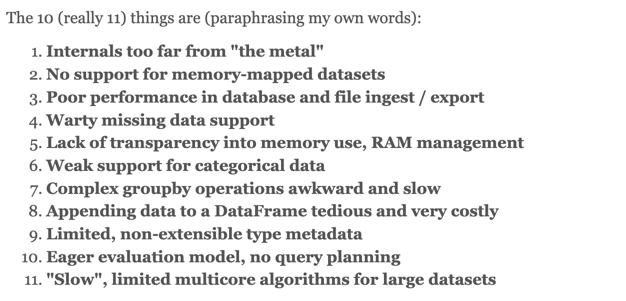
That paragraph sparked several frameworks to tackle the problem.
Today we’re going to look at a setup to let you split your dataframe across machines, perform actions on your dataframe with multiple cores and let you scale, and do with something you can take from your laptop to a cluster without logic changes.
There are two parts to this the first is Modin a python library that acts as a drop in replacement for Pandas, it covers about 80–90% of what Pandas does and falls back to a pandas implementation for what it misses. Meaning you can change
# import pandas as pd
import modin.pandas as pdAnd you’re halfway home. Modin by itself provides an abstraction layer and rewritten algebra for multiple engines or backends for python processing. By default it gives you parallel process, taking you from one CPU to multiple.

For the other 90% 🤡 of it, you need to look at using a distributed processing system and we’ll look at Ray a data and workload distributed platform.

Ray has a multitude of ways to run it, and has focused heavily on deployment and scaling with known cloud providers as well as K8
The simplest way to run Ray is to start with a docker compose to get comfortable with it. To do that I’ve put the most minimal docker file and compose together.
GitHub – pjaol/modin-on-ray
This is going to run a Ray cluster, that you can now execute modin code on. Lets get hacky — startup our cluster log into a node and run some adhoc code.
git clone https://github.com/pjaol/modin-on-ray.git
cd modin-on-ray
docker build -t ray-modin . #why did i name this backwards?
docker compose up -d --scale worker=2
docker ps
docker compose logs #take a peak at what's happeningAlright we’ve built a ray image that contains modin (check out the Dockerfile to see how we added the modin library), we’ve also logged into a ray worker. From the “docker ps” you will see you are running a ray head and 2 ray workers.

Lets see what’s running on one of the workers
docker exec -it ray-worker-1 bash
(base) ray@9165f93af47e:~$ ps -ef
UID        PID  PPID  C STIME TTY          TIME CMD
ray          1     0  0 08:16 ?        00:00:02 /home/ray/anaconda3/bin/python /home/ray/anaconda3/bin/ray start --block --address=head:6379
ray         22     1  3 08:16 ?        00:00:12 /home/ray/anaconda3/lib/python3.7/site-packages/ray/core/src/ray/raylet/raylet --raylet_socket_name=/tmp/ray/session_2023-01-20_08-16-32_013814_1/sockets/
ray         37     1  1 08:16 ?        00:00:04 /home/ray/anaconda3/bin/python -u /home/ray/anaconda3/lib/python3.7/site-packages/ray/_private/log_monitor.py --logs-dir=/tmp/ray/session_2023-01-20_08-16
ray         81    22  1 08:16 ?        00:00:06 /home/ray/anaconda3/bin/python -u /home/ray/anaconda3/lib/python3.7/site-packages/ray/dashboard/agent.py --node-ip-address=172.20.0.3 --metrics-export-por
ray        125     0  0 08:20 pts/0    00:00:00 bash
ray 151 125 0 08:23 pts/0 00:00:00 ps -efWe can see ray has been started in blocking mode, otherwise ray would go into daemon mode and docker would exit. As this is a worker we’ve passed the address of ray head which is a job coordinator, orchestrator and dashboard. There’s a raylet which listens for clients and object connections, a monitor and dashboard.
Lets see make sure our cluster is working and active
(base) ray@9165f93af47e:~$ python
Python 3.7.13 (default, Mar 29 2022, 02:18:16)
[GCC 7.5.0] :: Anaconda, Inc. on linux
Type "help", "copyright", "credits" or "license" for more information.
>>> import ray
>>> ray.init(address='auto')
2023-01-20 08:29:15,201 INFO worker.py:1342 -- Connecting to existing Ray cluster at address: head:6379...
2023-01-20 08:29:15,339 INFO worker.py:1525 -- Connected to Ray cluster. View the dashboard at http://127.0.0.1:8265
RayContext(dashboard_url='127.0.0.1:8265', python_version='3.7.13', ray_version='2.1.0', ray_commit='23f34d948dae8de9b168667ab27e6cf940b3ae85', address_info={'node_ip_address': '172.20.0.3', 'raylet_ip_address': '172.20.0.3', 'redis_address': None, 'object_store_address': '/tmp/ray/session_2023-01-20_08-16-32_013814_1/sockets/plasma_store', 'raylet_socket_name': '/tmp/ray/session_2023-01-20_08-16-32_013814_1/sockets/raylet', 'webui_url': '127.0.0.1:8265', 'session_dir': '/tmp/ray/session_2023-01-20_08-16-32_013814_1', 'metrics_export_port': 63283, 'gcs_address': 'head:6379', 'address': 'head:6379', 'dashboard_agent_listen_port': 52365, 'node_id': 'd556a3bbdac79fcf6e3fc721946d2e7475014aacb341417a390f6349'})
>>> pp(ray.cluster_resources())
{'CPU': 12.0,
 'memory': 7796833076.0,
 'node:172.20.0.2': 1.0,
 'node:172.20.0.3': 1.0,
 'node:172.20.0.4': 1.0,
 'object_store_memory': 3499540070.0}
>>>We’ve imported ray, we’ve initialized it with the address of the ray to auto, if that init fails you can explicitly set ray.init(address=’head:6379′).
⚠️Warning rays fallback is to start it’s own local ray cluster instance if init fails (which i’m not a fan of).
We’ve now got the the cluster resources with ray.cluster_resources, from here we can see there are 3 nodes and about 7.8gb in my case — there’s also an ray.available_resources which is probably more helpful on an active cluster.
Ray Dashboard
A really handy feature is the web based ray dashboard running on the head server at http://127.0.0.1:8265/

Lets process some data — we’re going to use a list of active businesses from the city of LA https://catalog.data.gov/dataset/?res_format=CSV (scroll down until you see Listing of Active Businesses)
# sample.py
import ray
ray.init(address="auto")

import modin.pandas as pd

@ray.remote(scheduling_strategy="SPREAD")
def download_data():
    import urllib
    # Download the data
    urllib.request.urlretrieve("https://data.lacity.org/api/views/6rrh-rzua/rows.csv?accessType=DOWNLOAD", 'businesses.csv')
    return 'businesses.csv'

## Lets explain this one ##
obj_rt = [download_data.remote() for _ in range(3)]
ray.get(obj_rt)
df = pd.read_csv("businesses.csv")

print(df[df["BUSINESS NAME"].str.contains("IN-N-OUT BURGER", na=False)])Executing the above code has now distributed your dataframe across multiple workers, scaled processing across multiple CPUs and gathered the results. Neat huh? 🔥 but wait why did I download data 3 times?
Making data available
We created a task in ray called download_data and designed it to SPREAD which is a scheduling method that causes a task to get executed on all clients in Ray. Yeah that means we’re downloading the same file 3 times, this lets modin read the file across all clients. Otherwise you’ll get file not found errors.
There are 2 work arounds, either place the file on a central data store, e.g. EFS or S3 or download once and use another framework Dask to read the CSV file locally.
Swapping between Dask & Ray
Changing execution engines in modin is a single line modin.config.Engine().put(‘<Engine name>’)
>>> import ray
>>> ray.init(address='auto')
>>> import modin.pandas as pd
>>> import modin # about to get tricky
>>> import urllib
>>> # Download the LA city business data
>>> urllib.request.urlretrieve("https://data.lacity.org/api/views/6rrh-rzua/rows.csv?accessType=DOWNLOAD", 'businesses.csv')
>>>
>>> # Set modin to use Dask temporarily to read data locally
>>> modin.config.Engine().put('Dask')
>>>
>>>
>>> df = pd.read_csv('businesses.csv')
>>> df.info()
<class 'modin.pandas.dataframe.DataFrame'>
RangeIndex: 563996 entries, 0 to 563995
Data columns (total 16 columns):
 #   Column                     Non-Null Count   Dtype
---  -------------------------  ---------------  -----
 0   LOCATION ACCOUNT #         563996 non-null  object
 1   BUSINESS NAME              563996 non-null  object
 2   DBA NAME                   193123 non-null  object
 3   STREET ADDRESS             563993 non-null  object
 4   CITY                       563948 non-null  object
 5   ZIP CODE                   563996 non-null  object
 6   LOCATION DESCRIPTION       563970 non-null  object
 7   MAILING ADDRESS            291813 non-null  object
 8   MAILING CITY               291829 non-null  object
 9   MAILING ZIP CODE           291695 non-null  object
 10  NAICS                      501704 non-null  float64
 11  PRIMARY NAICS DESCRIPTION  501704 non-null  object
 12  COUNCIL DISTRICT           563996 non-null  int64
 13  LOCATION START DATE        560411 non-null  object
 14  LOCATION END DATE          0 non-null       float64
 15  LOCATION                   547150 non-null  object
dtypes: object(13), float64(2), int64(1)
memory usage: 68.8 MB
>>> df
       LOCATION ACCOUNT #                                      BUSINESS NAME                        DBA NAME  ... LOCATION START DATE LOCATION END DATE              LOCATION
0       0000000150-0001-5      A A OFICINA CENTRAL HISPANA DE LOS ANGELES /C                             NaN  ...          01/01/1991               NaN                   NaN
1       0000000156-0001-2  SPRINGBOARD NON-PROFIT CONSUMER CREDIT MANAGEMENT  MONEY MANAGEMENT INTERNATIONAL  ...          02/01/1999               NaN                   NaN
2       0002842614-0001-2                                     AUSTIN B CREEK                             NaN  ...          09/01/2008               NaN   (34.168, -118.3463)
3       0003176540-0001-1                                      SOEUNG CHAING                        CAFECAFE  ...          01/01/2020               NaN  (33.7901, -118.2804)
4       0002728984-0001-8                                      MARIA ALVAREZ                             NaN  ...          01/01/2013               NaN  (34.2447, -118.4476)
...  ... ... ... ... ... ... ...
563991  0003344313-0001-5                                 J & J CONSTRUCTION                             NaN  ...          01/01/2022               NaN                   NaN
563992  0003345643-0001-8                                       PAYMON MOEEN                     PM PLUMBING  ...          08/30/2018               NaN   (34.0061, -118.431)
563993  0003344541-0001-3                                   BRITTANY KNUPPER                BRITTANY KNUPPER  ...          10/01/2019               NaN  (34.1157, -118.2617)
563994  0003339973-0001-6                                    K&T PARKING INC                             NaN  ...          11/21/2022               NaN      (34.039, 34.039)
563995  0003338256-0001-8                                   FREETH/MOROZ INC                             NaN  ...          12/01/2022               NaN                   NaN

[563996 rows x 16 columns]
>>>
>>>
>>> # Switch back to Ray
>>> modin.config.Engine().put("Ray")
>>>
>>>
>>> df[df["BUSINESS NAME"].str.contains("IN-N-OUT BURGER", na=False)]
       LOCATION ACCOUNT #                              BUSINESS NAME                                      DBA NAME  ... LOCATION START DATE LOCATION END DATE              LOCATION
5926    0000054319-0006-0  IN-N-OUT BURGERS A CALIFORNIA CORPORATION                           IN-N-OUT BURGER #35  ...          12/18/1984               NaN                   NaN
56114   0000054319-0018-3  IN-N-OUT BURGERS A CALIFORNIA CORPORATION                          IN-N-OUT BURGER #206  ...          04/10/2007               NaN  (34.1944, -118.6059)
60472   0000054319-0003-5  IN-N-OUT BURGERS A CALIFORNIA CORPORATION                           IN-N-OUT BURGER #10  ...          03/01/1972               NaN  (34.2216, -118.4304)
64582   0000054319-0010-8  IN-N-OUT BURGERS A CALIFORNIA CORPORATION                          IN-N-OUT BURGER #111  ...          12/27/1995               NaN  (34.1345, -118.3599)
83274   0000054319-0001-9  IN-N-OUT BURGERS A CALIFORNIA CORPORATION                           IN-N-OUT BURGER #18  ...          03/01/1976               NaN  (34.1721, -118.5671)
85904   0000054319-0002-7  IN-N-OUT BURGERS A CALIFORNIA CORPORATION                            IN-N-OUT BURGER #9  ...          05/01/1971               NaN   (34.177, -118.3819)
98917   0000054319-0005-1  IN-N-OUT BURGERS A CALIFORNIA CORPORATION                           IN-N-OUT BURGER #16  ...          04/01/1975               NaN  (34.2417, -118.2682)
135530  0000054319-0019-1  IN-N-OUT BURGERS A CALIFORNIA CORPORATION                         IN-N-OUT BURGER # 208  ...          08/07/2007               NaN  (34.2308, -118.5535)
137955  0000054319-0015-9  IN-N-OUT BURGERS A CALIFORNIA CORPORATION  IN-N-OUT BURGER # 151 | IN-N-OUT BURGER #151  ...          06/13/2001               NaN  (33.7536, -118.3089)
152980  0000054319-0004-3  IN-N-OUT BURGERS A CALIFORNIA CORPORATION                           IN-N-OUT BURGER #12  ...          06/01/1973               NaN  (34.2775, -118.4521)
156006  0000054319-0007-8  IN-N-OUT BURGERS A CALIFORNIA CORPORATION                           IN-N-OUT BURGER #55  ...          08/22/1989               NaN  (34.0263, -118.3937)
206100  0000054319-0014-1  IN-N-OUT BURGERS A CALIFORNIA CORPORATION                          IN-N-OUT BURGER #134  ...          12/09/1998               NaN  (34.2151, -118.4487)
227054  0000054319-0011-6  IN-N-OUT BURGERS A CALIFORNIA CORPORATION                                           NaN  ...          01/01/1997               NaN  (34.0647, -117.9802)
230819  0000054319-0020-5  IN-N-OUT BURGERS A CALIFORNIA CORPORATION                                           NaN  ...          02/01/2013               NaN  (34.0647, -117.9802)
285732  0000054319-0013-2  IN-N-OUT BURGERS A CALIFORNIA CORPORATION                          IN-N-OUT BURGER #119  ...          04/01/1997               NaN  (34.0631, -118.4482)
287424  0000054319-0017-5  IN-N-OUT BURGERS A CALIFORNIA CORPORATION                          IN-N-OUT BURGER #196  ...          10/05/2005               NaN  (34.2015, -118.5011)
293754  0000054319-0008-6  IN-N-OUT BURGERS A CALIFORNIA CORPORATION                           IN-N-OUT BURGER #85  ...          07/01/1993               NaN  (34.1519, -118.4486)
334770  0000054319-0012-4  IN-N-OUT BURGERS A CALIFORNIA CORPORATION                          IN-N-OUT BURGER #117  ...          01/22/1997               NaN  (33.9539, -118.3962)
434970  0000054319-0009-4  IN-N-OUT BURGERS A CALIFORNIA CORPORATION                          IN-N-OUT BURGER #102  ...          12/15/1994               NaN  (34.0979, -118.3416)
536550  0000054319-0016-7  IN-N-OUT BURGERS A CALIFORNIA CORPORATION                          IN-N-OUT BURGER #178  ...          01/01/2001               NaN  (34.2755, -118.5682)

[20 rows x 16 columns]Dask is another data framework designed similar to Pandas, not quite a drop in replacement, but it has one really great feature which is the ability to spill over onto disk.
Modin abstractd out the implementation and provides a dataframe that can swap between engines.
modin.config.Engine().put(“ray”) switches us back to using our ray cluster and you can execute as normal with the pandas methods in modin. e.g.
>>> df[df["BUSINESS NAME"].str.contains("IN-N-OUT BURGER", na=False)]Why not just use Dask then?
A great write up on the comparison is here but in essence Dask partitions dataframes into smaller dataframes for distributed and parallel computing, and uses a task graph where tasks aren’t performed until a compute() method is called. The biggest difference though is Dask it is row oriented, limiting what you can do and forcing you into more iteration based design, whereas Modin is row, column and vector based closer to a Pandas replacement.
Again this is simply to use read_csv on a single node, if your data isn’t on something like S3 and accessible to all workers, however you will hit an overhead of Modin having to distribute this data to workers once you start performing tasks on it.
Next steps / resources
You can read more on examples of modin https://modin.readthedocs.io/en/stable/getting_started/examples.html especially how to run scikit learn models on it.
Ray clustering and deployment in the cloud https://docs.ray.io/en/latest/cluster/getting-started.html
⚠️Be hyper vigilant using ray in the cloud, it comes with auto scaling features where if you’re not paying attention could leave you with a hefty bill if you fail to switch things off.
Why use Modin/Ray vs Spark?
Something that the folks in modin focused on was reducing the overhead of going from data scientist to production, usually a task of scaling code from hypothesising, exploration and demoing to large data deployment. Which often means a rewrite by another engineer, sometimes in another framework or language. With modin the same set of tools can be used from desktop to production or as modin says 1MB to 1TB (actually it’ll go higher than even that).
You can also see that we’ve quickly and easily have used modin in a cluster on our desktop without code change. Yes there are configurations and optimization when it comes to partitioning, resource scheduling, nums of CPU / GPU etc.. all very easy to handle.
Compared to the complexity and resource utilization of Spark it’s actually pleasant.
What are the cons?
There’s a lot of data locality and shuffling that can occur, in the big data world a key item in the early days was having services running on HDFS servers bringing compute and storage close together. However as storage needs grew so too did separation of data and processing. Meaning a lot of data shuffling occurs through the network.
With Ray this is also true, but given its age and maturity harder to determine and configure. Errors and servers can be temperamental and I’ve found instances die from OOM’s and shared memory filling up so I’m more inclined to say use with lots of monitoring or for adhoc jobs.
HA isn’t exactly baked it, the head node is an orchestrator if it goes down workers still process and will re-attach when it comes back online. So dynamic service addressing is a must / IP’s will screw you.
Conclusion
Is it perfect no, but it’s a hell of a long way down the road in giving you scale and capacity for processing Dataframes
Ship faster with The VGER Group
AI, data, and software engineering expertise bundled into outcomes—not tickets.